
Nameservers vs DNS Records: What Is the Difference?
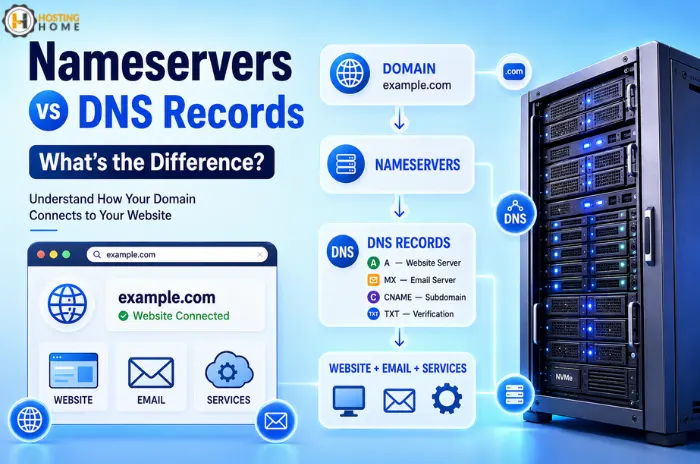
When you connect a new domain to a hosting account, you may come across two terms that sound similar: nameservers and DNS records.
This can be quite confusing for beginners. You may know that both are related to connecting your domain and website, but they do very different jobs.
Understanding the difference can save you from common issues like a website not opening, email not working, or your domain pointing to the wrong server.
First, What Happens When Someone Opens Your Website?
Let’s say that your domain is example.com.
A visitor types the domain in their browser. The browser needs to find the server hosting your website.
That’s where DNS helps answer that question.
Think of DNS as the internet’s address book. It tells computers where different services connected to your domain are located.
This is an important part of web hosting, but you usually don’t need to understand every technical detail to manage it.
What Are Nameservers?
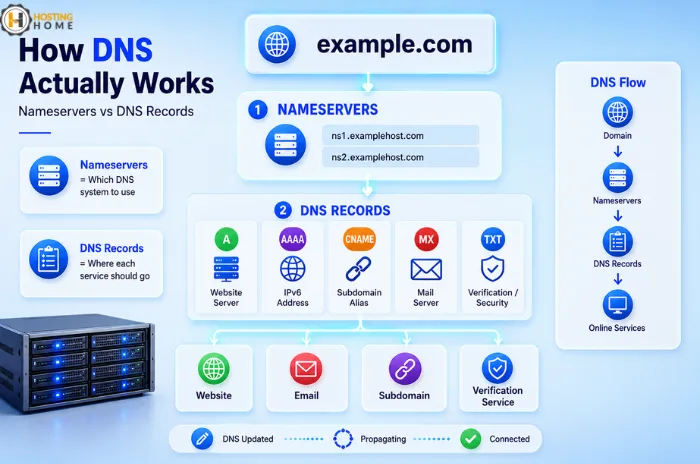
Nameservers tell the internet which DNS system is responsible for your domain. When you buy hosting, your hosting provider gives you two or more nameservers.
For example:
- ns1.examplehost.com
- ns2.examplehost.com
You need to add these nameservers at your domain registrar.
Then DNS information for your domain is managed through the hosting provider’s DNS system.
This is often the easiest option for someone starting with web hosting services because most DNS settings are available in a single control panel.
A Simple Example
Imagine you purchased a domain from Company A, but your web hosting is from another Company B.
You can change the domain’s nameservers to the hosting company’s nameservers. Once the change propagates, the domain starts using the new provider’s DNS zone.
What Are DNS Records?
DNS records are the individual instructions inside a DNS zone.
Instead of telling the internet which DNS provider to use, records tell it where specific services should go.
Some common records include:
| Record | Main purpose |
|---|---|
| A | Points a domain name to an IPv4 address |
| AAAA | Points a domain to an IPv6 address. |
| CNAME | Creates an alias for another hostname. |
| MX | Controls email delivery |
| TXT | Stores verification and security information |
| NS | Identifies authoritative nameservers. |
For example, an A record might tell the internet that:
example.com → 103.xxx.xxx.xxx
That IP address could be the server hosting your website.
Nameservers and DNS Records Work Together
The easiest way to understand the difference is to think about a building.
Nameservers are like telling someone which building directory to use.
DNS records are the individual directions in that directory.
So the process is roughly:
Domain → Nameservers → DNS Records → Website or other service
This is why changing nameservers and changing an A record are not the same thing.
When Should You Change Nameservers?
You usually change nameservers when you want another provider to host your domain’s DNS.
For example, when you migrate your website to another hosting company.
Your new provider will give you different nameservers. You will update them at the domain registrar and allow the changes to propagate.
This is common when migrating from web hosting providers.
When Should You Change a DNS Record?
You normally edit individual records when you want to change one service without moving the entire DNS setup.
For example:
- Point the website to a new server using an A record.
- Connect email through MX records.
- Verify a service using a TXT record.
- Point a subdomain to another application using a CNAME.
This gives you much more control.
A Real-World Example
Suppose a small business migrates its site from an old server to a new one.
The owner wants the website to use the new server but still wants the email working as before.
Changing the entire nameserver setup may not be necessary.
Instead, the website’s A record can be updated to the new server’s IP address, while the existing MX records remains unchanged.
This is one of the reasons why DNS knowledge becomes useful as the website grows.
Why DNS Changes Sometimes Take Time
DNS information is cached by different systems across the Internet. Because of this, a DNS change may not appear everywhere immediately.
You may update an A record and see the new website from one network while another network still uses the old server.
This is normal DNS propagation behaviour.
Avoid repeatedly changing settings while waiting. First confirm that the record is correct, then give the change time to spread.
Common DNS Mistakes to Avoid
A minor DNS error can bring an unexpectedly large issue.
Before changing anything:
- Check the correct server IP.
- Don’t delete MX records without understanding their purpose.
- Be careful when changing nameservers.
- Keep a copy of important DNS records before migration.
- Check both the root domain and the www record.
- Allow some time for the DNS changes to propagate.
If you are unsure, asking your hosting provider for help is often safer than making several random changes.
Nameservers or DNS Records: Which One Should You Use?
They are not competing options.
You use nameservers to identify the DNS authority for your domain, while DNS records control where individual services point.
If you are simply connecting a new domain to your hosting account, updating nameservers is often the easiest way.
If you want more control over websites, email, subdomains, or third-party services, managing individual DNS records gives you greater flexibility.
Choosing Hosting with Good DNS Support
When you compare web hosting India options, don’t look only at the web hosting price.
Easy DNS management and responsive support can be very useful, especially when you are moving a website or setting up email.
A good hosting service should make common tasks simple instead of forcing beginners to manage everything manually.
Conclusion:
Nameservers and DNS records are closely connected, but they have different responsibilities.
Nameservers tell your domain where its DNS information is managed. DNS records then provide the specific instructions for your website, email, subdomains, and other services.
Once you understand this difference, tasks like website migration and DNS setup become much less confusing.
Why Hosting Home?
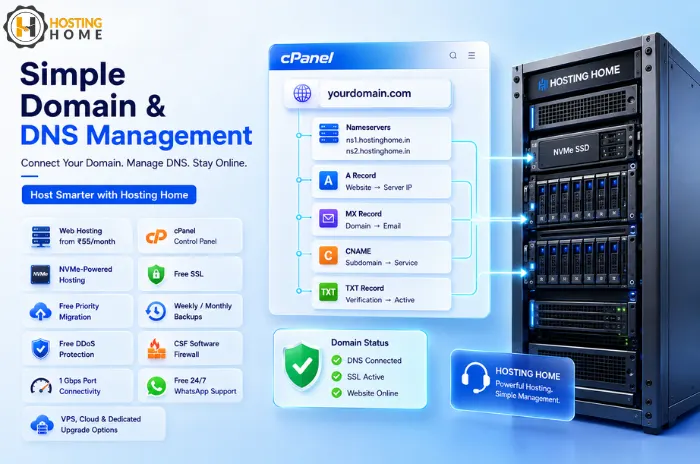
Hosting Home offers web hosting starting at ₹55/month, with features designed for websites that need a simple and reliable setup.
The service includes:
- cPanel for easier website management
- Free SSL for domains
- Free priority migration
- Weekly/monthly backup options
- Free DDoS protection
- CSF software firewall
- 1 Gbps port connectivity
- Free 24/7 WhatsApp support
- 24/7 high-priority support
- NVMe-powered hosting options
Hosting Home also offers multiple hosting solutions, so you can upgrade to a VPS, dedicated server, or cloud when your site needs it.
