
CNAME vs A Record: What Is the Difference?
If you’ve ever managed a domain, you may have seen DNS records such as A and CNAME. They both help connect a domain to a destination, but they aren’t used in the same way.
This can be confusing when you are setting up a new website domain, transferring your website to another server or connecting a subdomain to an external service.
The easiest way to understand them is to look at what these records actually tell DNS to do.
A Record: Pointing a Name to an IP Address
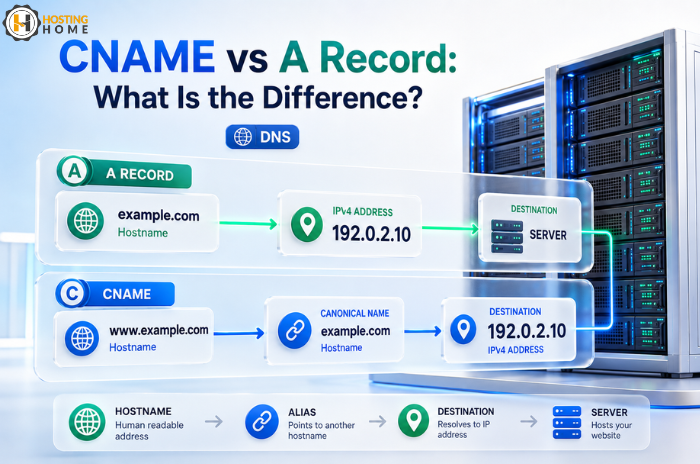
An A record connects a hostname directly to an IPv4 address.
For example:
example.com → 192.0.2.10
When someone enters example.com, DNS can use the A record to find the server’s IP address.
A records are commonly used for the main website address.
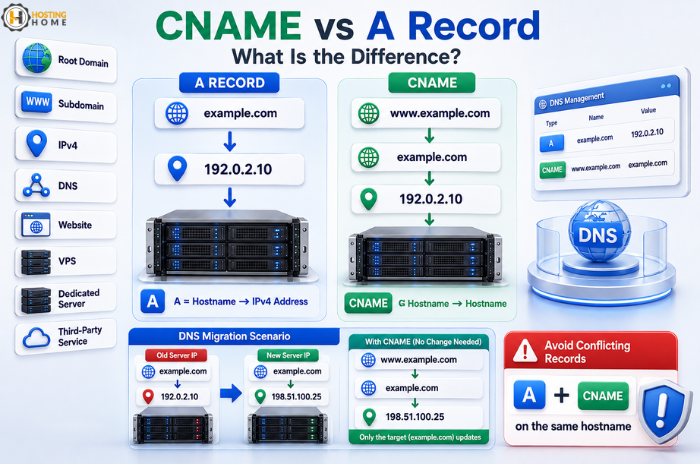
If you move your website to a new hosting server, you may need to change your A record to the new server IP.
A simple example
Suppose your website currently runs on:
203.0.113.20
Your A record could look like:
Type: A
Name: @
Value: 203.0.113.20
The exact interface depends on where you manage your DNS.
CNAME: Pointing One Name to Another Name
A CNAME record works differently.
Instead of pointing directly to an IP address, it points one hostname to another hostname.
For example:
www.example.com → example.com
A CNAME could be:
Type: CNAME
Name: www
Value: example.com
DNS then follows the destination hostname to find its final address.
This is useful when you want multiple hostnames to follow the same destination without manually entering an IP address for each one.
The Difference in One Table
| A Record | CNAME Record |
|---|---|
| Points to an IPv4 address | Points to another hostname |
| Most frequently used for root domains | Commonly used for subdomains |
| Example: example.com → IP | Example: www → example.com |
| IP needs to be changed when the server address changes | Destination hostname can remain the same |
This difference becomes especially helpful when managing domain hosting for multiple websites.
When Should You Use an A Record?
Use an A record when you know the server’s IPv4 address and want a hostname to point directly to it.
Typical examples include:
- Main website
- VPS server
- Dedicated server
- Mail server, when configured appropriately
- Application server
If your hosting company has given you an IP address for your website, then an A record is usually part of the setup.
When Is CNAME Better?
CNAME is useful when the destination is another hostname rather than a fixed IP.
For example, a third-party service might tell you to create:
blog.example.com → customer.service-example.com
Instead of managing the service’s IP yourself, you point the subdomain to the hostname they provide.
If that service later changes its IP address, the provider can update its own DNS without requiring you to change your record.
A Real Website Migration Example
Imagine you buy website domain from one company and use hosting from another company.
Your old website is running at:
192.0.2.25
The new hosting provider gives you:
192.0.2.80
If you control the DNS zone yourself, you can update the A record from your old IP to the new one.
For www, you might instead use a CNAME record pointing to the main domain.
This setup allows both addresses to point to the intended destination.
One Important Rule: Don’t Mix Them Incorrectly
The most common beginner mistake is trying to create a CNAME and an A record for the same hostname.
For example, don’t normally configure:
www → A → 192.0.2.80
www → CNAME → example.com
at the same time.
These records are used for different purposes, and conflicting records can lead to unexpected DNS behaviour.
If you don’t know which one to use, check the instructions provided by your hosting company or service provider.
What About the Root Domain?
The root domain is the domain without a hostname in front of it.
For example:
example.com
Many DNS systems traditionally use an A record for the root domain, because standard CNAME behaviour has restrictions at the zone root.
Some modern DNS providers offer special records such as ALIAS or ANAME for similar functionality, but these are provider-specific.
For new users, follow the DNS instructions given by your hosting provider rather than changing the advanced records unnecessarily.
DNS Mistakes That Cause Website Problems
When managing a domain, a small mistake can make the website disappear.
Before changing records:
- Check the correct IP address.
- Confirm whether the provider requires A or CNAME.
- Don’t delete existing MX records when updating website DNS.
- Keep a copy of existing DNS settings before migration.
- Avoid changing several records at once without understanding them.
Keep in mind that DNS propagation may take time to appear everywhere because different systems cache DNS information.
Does Your Registrar Need to Host Your DNS?
No.
You can buy domain online from one company and manage DNS somewhere else.
Your domain registration and Web hosting can be with different providers.
However, keeping hosting and domain with one provider can be easier for new users because billing, DNS, SSL and support may all be managed from one place.
Final Takeaway:
The easiest way to remember the difference is:
A record = hostname → IPv4 address
CNAME = hostname → another hostname
Once you understand these basic differences, many common DNS tasks become much easier. Use an A record when you need to point directly to an IPv4 address, and use CNAME when a service offers you another hostname as a destination.
Domains and Hosting at Hosting Home
Hosting Home offers domain and hosting services for individuals, developers and businesses.
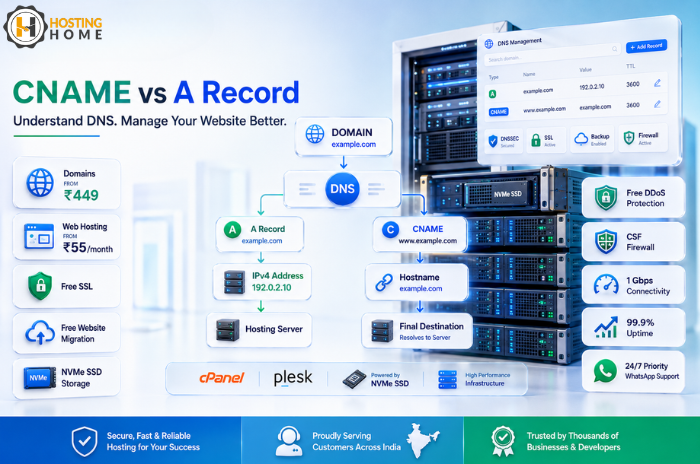
Domains start at ₹449, while Web hosting starts at ₹55/month.
Hosting features include:
- cPanel/plesk control panel
- Free SSL certificates
- NVMe SSD storage
- Free website migration
- Weekly/monthly backup options
- Free DDoS protection
- CSF firewall
- 1 Gbps port connectivity
- 99.9% uptime guarantee
- High-priority 24/7 WhatsApp support
Whether you are planning a domain purchase, transferring an existing website or starting a new project, understanding A and CNAME records can make DNS management much easier.
