

How to Fix 500 Internal Server Error?
It is frustrating to see 500 Internal Server Error on your website. It usually means something went wrong on the server, but the exact reason is not always shown clearly.
This error can impact your website’s performance, visitors and your business. No matter whether you are using web hosting for a small website or a business platform, it is important to fix this issue as soon as possible.
We will walk through simple steps to identify and fix the issue in this guide.
What Is 500 Internal Server Error?
A 500 error is a general server error. It means that the server was not able to complete your request due to some issue.
This issue may occur in any type of web hosting services, whether basic or advanced.
The main problem is that the error message does not show the exact reason, thus you need to check step-by-step.
Start with the Basic First.
Always try simple checks before making any technical changes.
- Refresh the page
- Clear browser cache
- Try opening the website on another device.
In some cases, the issue is temporary and gets resolved automatically.
Check .htaccess File Carefully.
A problem in the .htaccess file is one of the most common reason for this error.
To fix it:
- Rename the file temporarily.
- Refresh your website
- If the error disappears, re-create the file.
This issue is common in websites that are hosted on cheap web hosting plans where manual changes are frequent.
Look for Plugin or Theme Issues.
If you are using a CMS such as WordPress, plugin or themes may cause errors.
Try this:
- Disable all plugins
- Enable them one by one.
- Identify the problematic one.
This method works well for users using best web hosting services with control panel access.
Check File Permissions
Wrong files permissions can block server access.
Typical settings:
- Files: 644
- Folders: 755
If permissions are wrong, your website may display a 500 error.
Most web hosting company dashboards allow you to fix this easily.
Increase PHP Memory Limit.
Sometimes your site may run out of memory.
You can increase memory by:
- Editing php.ini
- Adding code in .htaccess
- Using control panel settings.
This helps websites running on fastest web hosting environments where applications need more resources.
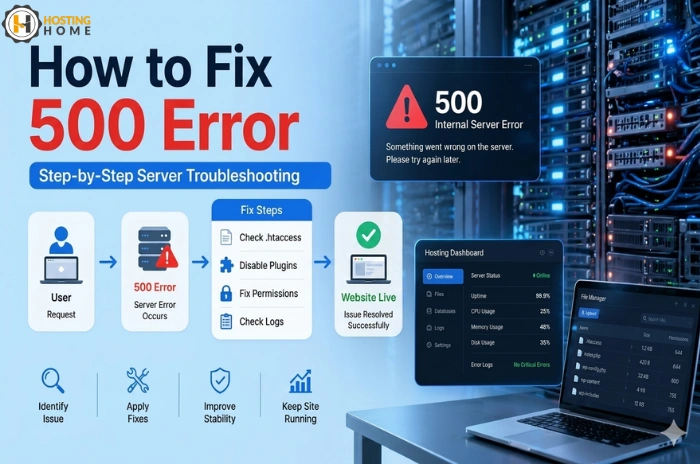
Check Server Error Logs.
Errors Logs provide exact information about the issue.
You can find Logs in your hosting panel and check:
- PHP errors
- Script failures
- Server issues
This step is very useful for debugging problems in web hosting plans.
Re-upload Core Files
You may face this error, if your website files are corrupted.
Solution:
- Re-upload core files
- Keep your content safe.
- Replace damaged files
This is useful for websites running on cheap web hosting service providers where files may get corrupted easily.
Contact Hosting Support When Needed.
If none of the steps works, the issue may be from the server side.
A good hosting provider will:
- Check server configuration
- Fix backend issues
- Recover backups if needed.
This is why choosing the best web hosting provider is important.
How to avoid 500 mistakes in Future.
To prevent such issue in future:
- Keep your website updated.
- Do not install unknown plugins.
- Take regular backups
- Monitor server usage
These small steps can save time and avoid downtime.
Why Hosting Quality Matters?
Many 500 errors occur due to poor hosting servers.
A good hosting provider ensures:
- Stable servers
- Proper configurations
- Fast support
Users comparing web hosting price should always consider security, not just price.
Why Choose Hosting Home for Web Hosting Services?
If you want to avoid server errors and maintain stable website, Hosting Home provides high-speed and secure hosting services.
- Reliable web hosting services with strong uptime.
- Affordable web hosting services.
- Flexible web hosting plans for growing websites.
- Fastest web hosting with high-speed servers.
- Free SSL certificates
- Free weekly backups
- Free DDoS protection
- Free migration support
- 99.99% uptime guarantee
- Free 24/7 Dedicated WhatsApp support

Hosting Home is a trusted web hosting company providing secure and reliable hosting services.
If you are looking for the best web hosting services with good performance and support, Hosting Home is the right choice to host your website in 2026.
